 en
en zh
zhThis is an old revision of the document!
Embed System under Same Domain
Same embeded domain means
- agents login through asterCC panel
- the start page and asterCC are under a same domain name, e.g., at the asterCC server.
- First, we neet two files, sample.html and popup.html(source code on the bottom), as the page for receive events and popup, and upload the files to asterCC server. The path is /var/www/html/asterCC/app/webroot
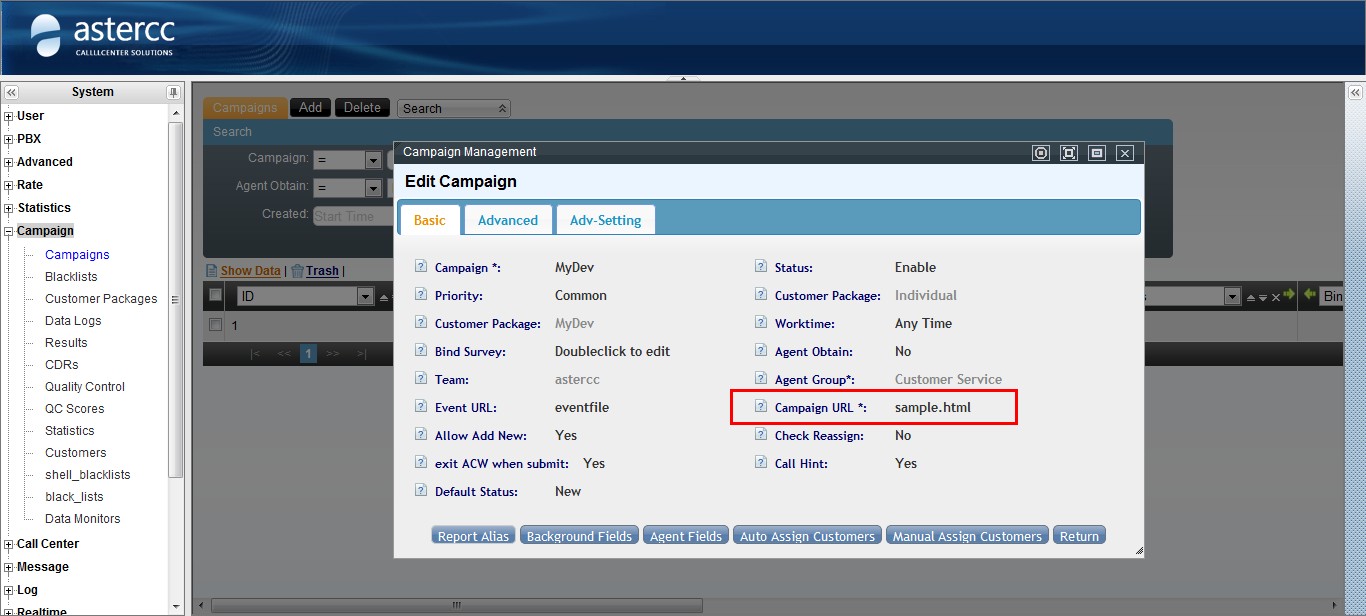
- The we need to set sample.html as the default page, and now we need to borrow the campaign module.
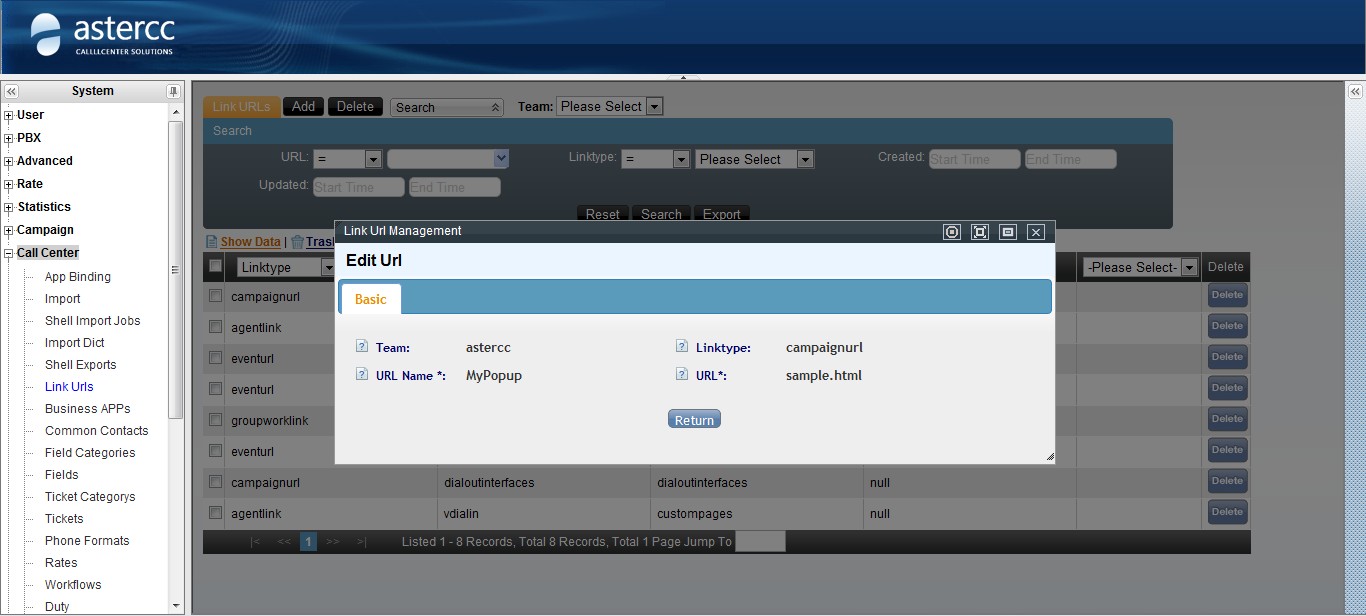
- Enter call center → link urls, and add a link, whose type has to be campaignurl, and we enter sample.html after the URL.
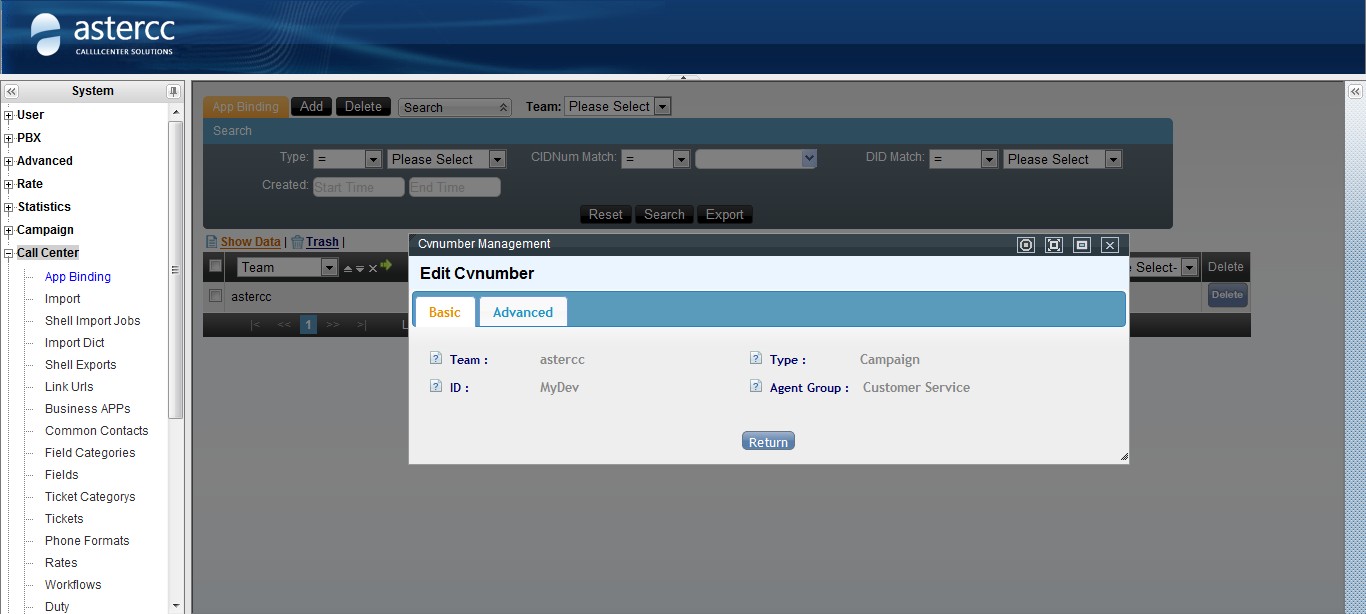
- Enter call center → app binding, and make this campaign the default inbound popup.
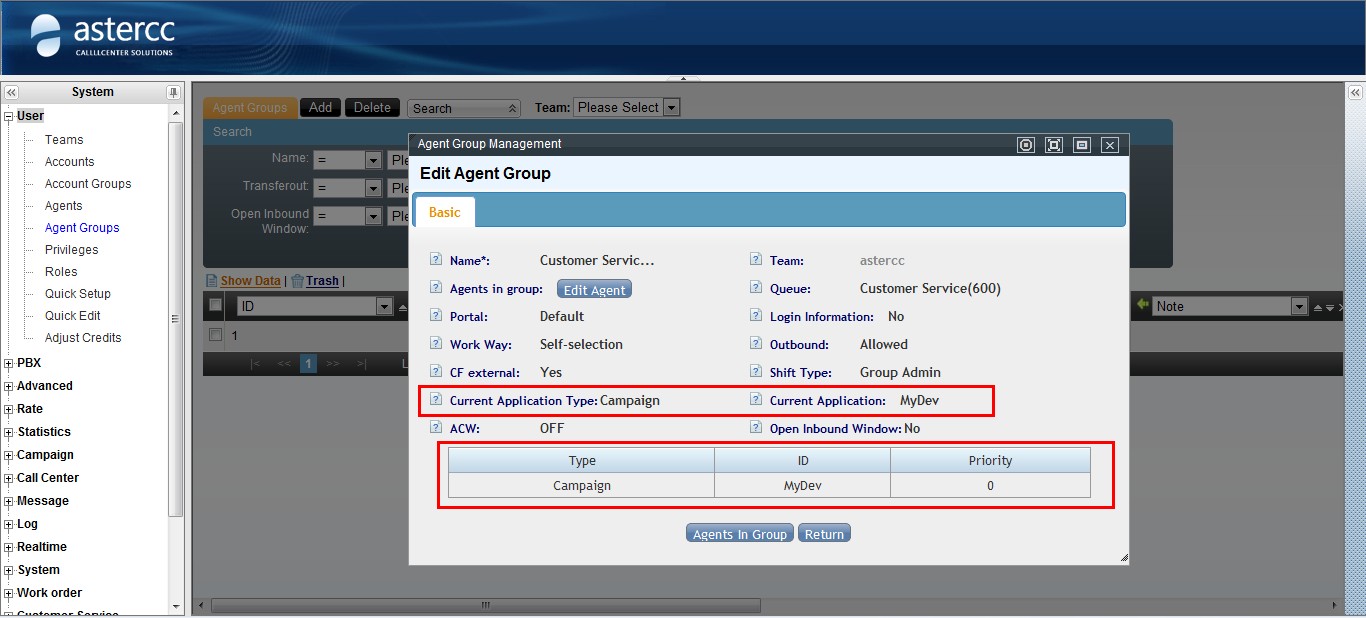
- Enter user → Agent Groups to edit agent group. Make this campaign the default outbound popup.
- 使用坐席登陆,使用软电话外呼,获得弹屏
- 可以看到新弹出的页面通过url获取到了参数
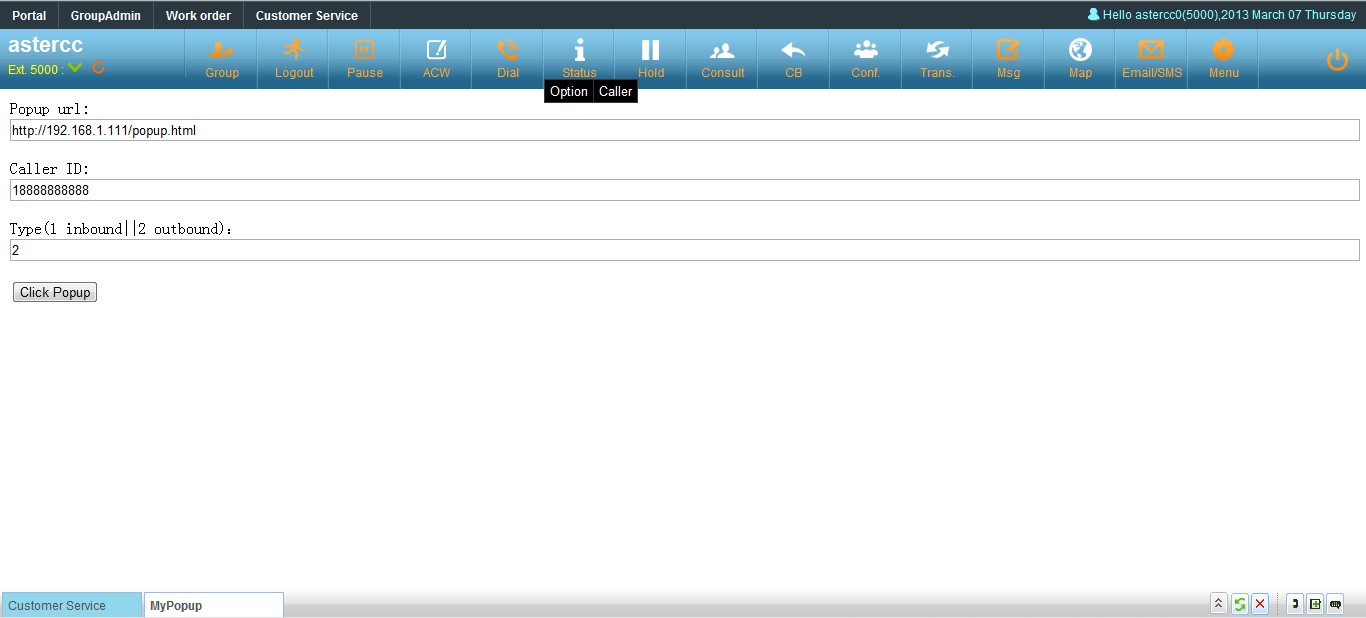
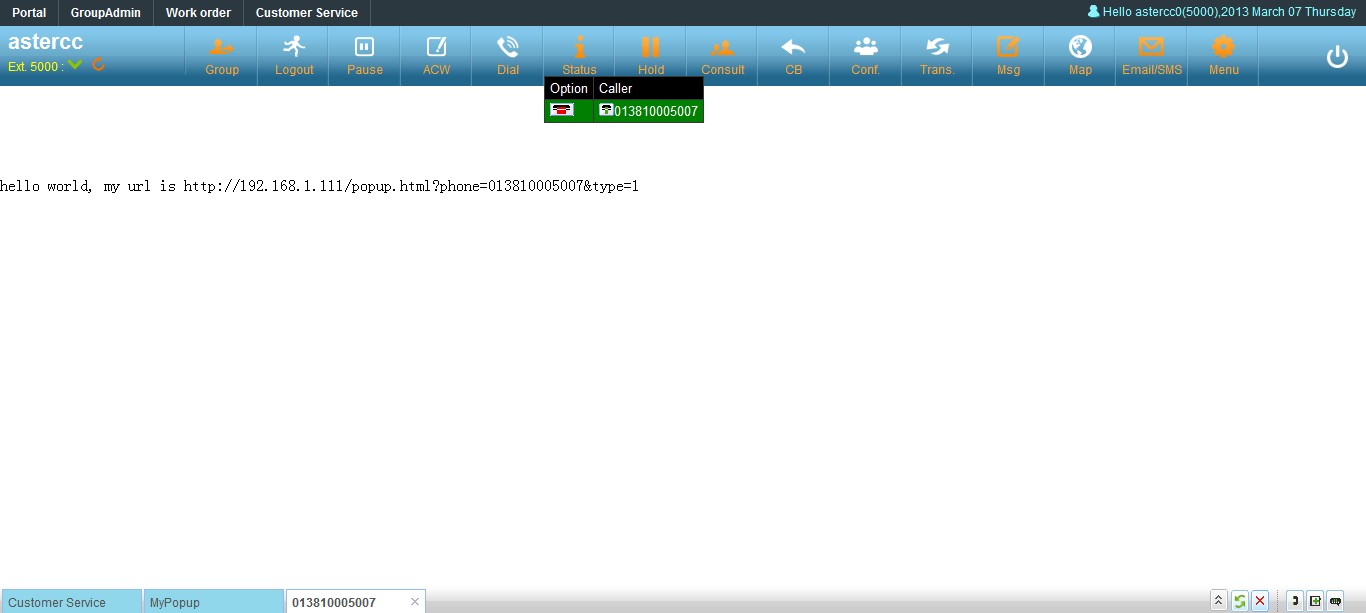
sample.html
<!DOCTYPE HTML PUBLIC "-//W3C//DTD HTML 4.01 Transitional//EN" "http://www.w3.org/TR/html4/loose.dtd">
<html>
 <head>
  <title> asterCC development sample (local domain)</title>
  <meta name="Author" content="">
  <meta name="Keywords" content="">
  <meta name="Description" content="">
  <meta http-equiv="Content-Type" content="text/html; charset=UTF-8" />
  <script type="text/javascript" src="/js/jquery/jquery-1.4.2.min.js"></script>
  <script type="text/javascript">
  <!--
	var tabflag;
	function sonAccept(msgStr){
		var eventAll = msgStr.split('&');
		var aryEvent = new Array();
		for(i=0;i<eventAll.length;i++) {
			var tmpstr = eventAll[i].split('=');
			eval("aryEvent['"+tmpstr[0]+"'] = '"+tmpstr[1]+"';");
		}
		// only popup when event is agent ring
		if(aryEvent['source'] == 'AGENT' && aryEvent['event'] == 'ringing'){
			$('#ringnum').attr('value',aryEvent['calleridnum']);
			var ringtypeval = 2;
			if(aryEvent['calltype'] == 'dialout'){
				ringtypeval = 1;
			}
			$('#ringtype').attr('value',ringtypeval);
			var popurl = $('#popurl').val()+'?phone='+aryEvent['calleridnum']+'&type='+ringtypeval;
			tabflag = "uc"+aryEvent['calleridnum']+((new Date()).getTime());
			// call the main function to popup tab with the url
			window.top.addTab(tabflag,popurl,aryEvent['calleridnum'],"yes");
		}else{
			window.top.showDiv('gid'+tabflag);
		}
	}
	$().ready(function(){
		$('#clickpop').click(function(){
			var url = $('#popurl').val()+'?phone='+$('#ringnum').val()+'&type='+$('#ringtype').val();//?phone=13585306891&type=2
			window.top.addTab("uc"+$('#ringnum').val()+((new Date()).getTime()),url,$('#ringnum').val(),"yes");
		});

		var str = self.location.href;
		str = str.replace(/sample\.html/,"");
		document.getElementById("popurl").value= str + 'popup.html';

	});
  //-->
  </script>
 </head>

 <body>
 <div style="margin:10px 10px;">
	Popup url: <input type="text" value="" id="popurl" style="width:100%;">
	<p />
	Caller ID: <input type="text" value="18888888888" id="ringnum" style="width:100%;">
	<p />
	Type(1 inbound||2 outbound):<input type="text" value="2" id="ringtype" style="width:100%;">
	<p />
	<input type="button" value="Click Popup" id="clickpop">
 </div>
 </body>
</html>
popup.html
<!DOCTYPE HTML PUBLIC "-//W3C//DTD HTML 4.01 Transitional//EN" "http://www.w3.org/TR/html4/loose.dtd">
<html>
 <head>
  <title> popup page </title>
  <meta name="Author" content="">
  <meta name="Keywords" content="">
  <meta name="Description" content="">
 </head>

 <body>
 <br/>
 <br/>
 <br/>
 <br/>
 <br/>
  hello world, my url is
<script type="text/javascript">
<!--
	var url = self.location.href;
	document.write(url);
//-->
</script>

 </body>
</html>


